What Skills Should a PSD to HTML Developer Have?
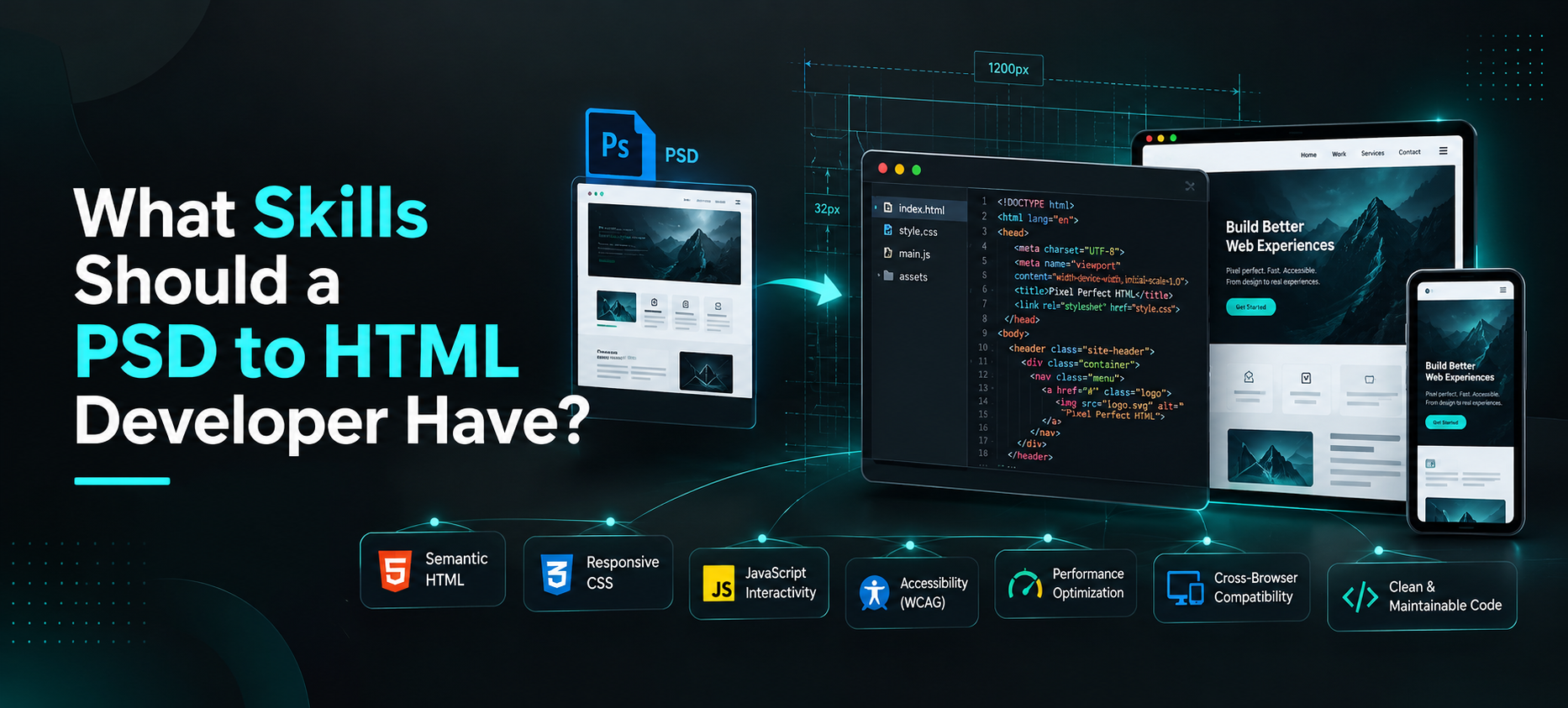
A good PSD to HTML developer needs more than basic HTML and CSS knowledge. They should be able to take a static Photoshop design, understand how it is supposed to behave in a browser, reproduce it accurately, make it responsive, and deliver code that another developer can work with later.
That means looking beyond whether the final page simply “looks like the PSD.”
When you hire someone for PSD to HTML conversion, you should also be looking at semantic markup, responsive CSS, accessibility, browser testing, page performance, JavaScript skills, attention to design details, and overall code quality.
If you are comparing developers or agencies, these are the skills that matter most.
The Core Skills a PSD to HTML Developer Needs
Not every PSD conversion project is technically complex. Some are straightforward landing pages. Others include complex navigation, sliders, forms, custom animations, unusual layouts, and multiple responsive states.
Regardless of project size, there are a few skills we would expect a capable front-end developer to have.
1. Semantic HTML
HTML is the foundation of the conversion, but knowing how to write HTML tags is only the starting point.
A developer should understand how to structure the page properly.
That means using headings for headings, navigation elements for navigation, buttons for actions, lists where lists make sense, and form elements that are correctly associated with their labels.
Why does this matter?
Because two pages can look almost identical while being very different underneath.
One might be built with a sensible document structure that search engines, browsers, screen readers, and other developers can understand.
The other might be made from layers of generic containers with no real meaning.
Both can match a screenshot. Only one is a strong foundation for a real website.
When reviewing a PSD to HTML developer, do not judge the work only by what appears on the screen. The markup behind the page matters too.
2. Modern CSS and Responsive Design
This is one of the most important skills in PSD to HTML work.
A PSD often shows a fixed design at one particular width. Real websites do not have that luxury.
Visitors may open the same page on a 27-inch desktop display, a laptop, a tablet, or a small phone.
The developer has to work out what happens between those screen sizes.
Suppose the PSD shows four service cards across one row.
At desktop size, that may look perfect.
But what happens when the available width gets smaller?
Should the cards move into two columns? Should they stack one below another? Does the spacing need to change? Should the typography scale down? Does an image remain beside the text or move above it?
These decisions require a solid understanding of responsive CSS.
A developer should be comfortable working with tools and techniques such as Flexbox, CSS Grid, media queries, fluid widths, responsive spacing, flexible images, and sensible breakpoints.
In the PSD-to-HTML projects we work on, responsive behavior is often where the biggest development decisions happen.
A desktop design at 1440px may be clear, but the developer still has to decide how that same section should behave at 768px or 375px without losing the original design intent.
That is why responsive development should never be treated as an afterthought.
3. JavaScript for Interactive Elements
Not every PSD to HTML project requires a lot of JavaScript.
But, a lot of designs have elements that cannot be implemented using HTML and CSS only.
For example:
- Dropdown navigation
- Mobile menus
- Accordions
- Tabs
- Sliders
- Popups
- Modals
- Filters
- Form validation
- Interactive content sections
A PSD can show what these features look like, but it cannot make them work.
The developer needs enough JavaScript knowledge to build the required behavior without making the page unnecessarily complicated.
There is also a difference between adding JavaScript because the project needs it and adding a large library for something that could have been handled with a small amount of code.
Good front-end developers tend to understand that difference.
4. Pixel-Accurate Design Implementation
Clients who provide a finished PSD generally expect the coded page to look like the approved design.
That makes attention to detail important.
The developer should be able to match things such as:
- Typography
- Font weights
- Colors
- Section spacing
- Alignment
- Image proportions
- Button sizes
- Border radius
- Shadows
- Content widths
- Grid spacing
These details are easy to dismiss individually.
Put enough small differences together, though, and the finished website can feel noticeably different from the approved design.
Pixel accuracy does not mean blindly copying every fixed measurement from Photoshop.
A browser is flexible. A PSD is not.
The better approach is to reproduce the visual intent accurately while allowing the layout to behave naturally as screen size and content change.
That balance takes experience.
5. Cross-Browser Compatibility
A page working correctly in one browser does not automatically mean the job is finished.
A developer should test the final front end in the browsers and environments included in the project requirements.
This is particularly important for complex layouts, forms, custom fonts, CSS effects, and JavaScript interactions.
Problems are not always dramatic.
You might find that a layout shifts slightly in one browser, an input field looks different, an animation behaves unexpectedly, or a menu stops working correctly at a particular width.
That is why browser testing should be part of the development process instead of something left to the client after delivery.
When hiring a PSD to HTML developer, ask what browsers they test and how browser-related issues are handled.
6. Accessibility
Accessibility should not be something added after the page has already been built.
Many basic accessibility decisions happen while the HTML is being written.
A developer should understand practical fundamentals such as heading order, form labels, keyboard navigation, meaningful link text, alternative text, focus states, and appropriate use of HTML elements.
Consider a custom button in the PSD.
Visually, it may just look like a rectangle with some text inside.
The developer still needs to decide whether that element is actually a button or a link, whether somebody can reach it with a keyboard, and whether its focus state is visible.
Those decisions are part of front-end development.
A design can look excellent and still be frustrating to use if these details are ignored.
7. Performance Optimization
Design files are usually created for visual quality, not website performance.
A PSD may contain large photographs, high-resolution graphics, unnecessary assets, or effects that would be expensive to reproduce directly on the web.
A good front-end developer should know how to turn those design assets into something practical for a browser.
This can include choosing the right image formats, reducing the size of images, compressing assets, not loading unused scripts, handling CSS, and not loading unused resources on the page.
This becomes particularly important when a visually rich PSD contains several large images.
Simply exporting everything at the highest possible quality may preserve the appearance, but it can produce a page that feels slow.
The developer’s job is to find a sensible balance between visual quality and performance.
8. Git and Clean Code Practices
It might not be obvious in the PSD, but it’s important for projects with more than one person.
A developer must understand how files are organized, what naming conventions are used, avoid unnecessary duplication and keep the code readable.
In team projects, Git is also useful to know.
It makes changes easier to track and helps multiple developers work on the same project without passing ZIP files back and forth.
Clean code becomes even more important if the HTML will later be integrated into WordPress, WooCommerce, a custom CMS, or another application.
The person doing the integration should not have to rebuild the front end because the original files are too difficult to understand.
Does a PSD to HTML Developer Need jQuery or PHP?
Not necessarily.
This is where older PSD to HTML advice can become misleading.
What About jQuery?
jQuery was a staple of front-end projects at one point, and you might still find it in legacy websites, plugins or codebases.
That is why knowing jQuery is useful in some contexts.
It should not, however, be treated as a mandatory requirement for every new PSD to HTML project.
Vanilla, modern JavaScript can replicate jQuery’s many functions.
If your existing website already relies heavily on jQuery, then experience with it may be relevant. For a new standalone HTML conversion, it is better to focus on whether the developer understands JavaScript and can choose an appropriate solution for the feature being built.
What About PHP?
PHP is not a core requirement for basic PSD to HTML conversion.
HTML conversion is primarily front-end work.
There are a few reasons the developer may need PHP, if the project moves beyond static front-end development and into something that specifically needs PHP, such as WordPress theme development or some back-end functionality.
For example, converting a PSD into an HTML version of a blog page does not automatically require PHP.
Another project is to take the same design and turn it into a working WordPress theme.
This is an important distinction when comparing quotes because PSD to HTML development and PSD to WordPress development do not always involve the same scope or skills.
How Can You Evaluate a PSD to HTML Developer Before Hiring?
A portfolio is useful, but do not stop at screenshots.
Screenshots tell you whether a project looks attractive. They do not tell you whether the code is clean, whether the page works well on a phone, or whether the developer simply reproduced a design that somebody else created.
Before hiring, there are a few things worth checking.
Look at the Work on Different Screen Sizes
Open previous projects on desktop and mobile.
Do sections adapt naturally?
Does the content become cramped?
Are buttons still comfortable to use?
Does navigation work properly?
Pay particular attention to layouts that resemble your own project.
If your design uses complex tables, large navigation menus, overlapping elements, unusual grids, or interactive sections, relevant experience matters more than a large portfolio of simple landing pages.
Ask to See Code
If code quality matters to your project, ask for a sample.
You do not need to perform a complete technical audit.
Even a quick review can tell an experienced developer whether the structure appears organized or whether everything has been forced into place.
If you have an internal development team, let them review the sample before committing to a larger project.
Ask How Responsive Decisions Are Made
This is especially useful if you only have desktop PSDs.
Ask what happens when the developer reaches a layout that has no mobile reference.
Do they simply stack everything?
Do they ask for clarification?
Do they make decisions based on the design system and surrounding sections?
There is no single correct answer for every project, but the response will tell you a lot about how the developer thinks.
Check Their Attention to Typography and Spacing
When comparing the coded page with the PSD, look beyond the obvious.
Check line height, font weight, content width, padding, section spacing, icon alignment, and image proportions.
Small details are often where the difference between an average conversion and a polished one becomes visible.
Ask About Accessibility and Browser Testing
You do not need to turn the conversation into an interview about standards.
Simple questions are enough.
What browsers do you test?
Will the mobile menu work with a keyboard?
Are forms built with proper labels?
How are heading levels handled?
A developer who considers these things during development will usually give a much clearer answer than one who plans to deal with them only if somebody reports a problem.
Discuss the Final Handoff
Ask what you will receive.
For example:
- HTML files
- CSS files
- JavaScript
- Images and other assets
- Fonts or font references
- Source files
- Documentation, if required
If somebody else will integrate the front end later, tell the developer before the project begins.
It can affect how the files should be organized.
What Are the Most Common PSD to HTML Conversion Mistakes?
A design can look correct at first glance and still have weaknesses that become obvious later.
Here are some problems we see buyers overlook.
Building Only for the Desktop PSD
The developer reproduces the exact desktop layout but gives little thought to how the page behaves on smaller screens.
The result may technically be “responsive,” but sections stack awkwardly, spacing becomes inconsistent, or content feels squeezed.
Responsive behavior needs to be considered section by section.
Using Images for Text or UI Elements
Some older conversion methods relied heavily on slicing parts of the design into images.
That approach makes content harder to edit and can hurt accessibility and performance.
Text should generally remain text, while common interface elements should be reproduced with HTML and CSS where practical.
Excessive Absolute Positioning
Absolute positioning has legitimate uses.
Using it to place nearly every element on the page is usually a warning sign.
A layout built this way may match the PSD at exactly one width while breaking as soon as the screen or content changes.
Ignoring Real Content
Design mockups normally use a specific amount of text.
The live website may not.
A heading could become longer. A testimonial might contain three extra sentences. A button label could change.
The layout should have enough flexibility to handle realistic content changes without falling apart.
Adding unnecessary javascript
You don’t need a plugin or a big JavaScript dependency for every visual effect.
Too much JavaScript can make a simple front end harder to maintain and may introduce unnecessary performance problems.
The technology should fit the feature, not the other way around.
Skipping QA Because the Page “Looks Fine”
Some issues appear only at certain widths or during interaction.
That is why responsive testing, browser checks, form testing, and interaction testing matter even when the initial desktop version looks accurate.
PSD to HTML or Figma to HTML: What Are the Required Skills?
For the developer, many of the core front-end skills are the same.
Both workflows need HTML, CSS, responsive design, JavaScript where necessary, browser testing, accessibility and performance considerations in the end.
The main difference is the source design.
Figma is built for digital interface design and typically makes it easier for developers to inspect spacing, colors, components and assets.
PSD files can need a bit of extra interpretation, especially if the PSD is meant to be a static visual composition, rather than a structured UI design.
This is why PSD experience can still be useful.
A developer sometimes has to infer more about responsive behavior and extract assets differently than they would from a well-prepared Figma file.
If your project uses Figma instead of Photoshop, a Figma to HTML conversion service may be the more relevant workflow.
Frequently Asked Questions
Do developers still convert PSD files to HTML?
Yes. Photoshop is no longer the dominant UI design tool it once was, but businesses and agencies still have approved PSD designs that need to be converted into working web pages. PSD to HTML remains useful when Photoshop is the source design format.
Does PSD to HTML require JavaScript?
Not always. A simple static page may need little or no JavaScript. JavaScript becomes necessary when the design contains interactive features such as mobile menus, tabs, sliders, popups, accordions, or form behavior.
Does a PSD to HTML developer need PHP?
Not for standard front-end conversion. PHP becomes relevant when the project includes PHP-based backend work or platforms such as WordPress. PSD to HTML and PSD to WordPress should therefore be treated as different scopes.
What is the difference between PSD to HTML and Figma to HTML?
The main difference is the source design file. PSD to HTML starts from Adobe Photoshop files, while Figma to HTML starts from Figma designs. The front-end development skills required are largely similar, although Figma generally provides a workflow that is more closely aligned with modern UI design and developer handoff.
How do I know whether a PSD to HTML conversion is high quality?
Compare the coded page with the original design on several screen sizes. Check typography, spacing, responsiveness, navigation, interactions, browser behavior, page performance, and accessibility. If the project will be maintained by another developer, code organization should also be reviewed.
The Best PSD to HTML Developers Think Beyond the PSD
It is relatively easy to judge PSD to HTML development by asking one question:
“Does the page look like the design?”
That matters, but it is not enough.
A professional conversion also has to work when the browser becomes narrower, when the content changes, when somebody uses a keyboard instead of a mouse, and when another developer needs to work on the code six months later.
That is why the best PSD to HTML developers combine visual accuracy with solid front-end fundamentals.
When hiring, look for somebody who understands semantic HTML, responsive CSS, JavaScript, accessibility, performance, browser testing, and maintainable code. Then look at how carefully they reproduce the design itself.
You need both.
If you already have approved Photoshop designs and are looking for a team to turn them into responsive, production-ready front-end pages, explore Pixel Perfect HTML’s PSD to HTML conversion service and share your designs with our team for review.
About the Author