


Semantic HTML in 2026: Benefits for SEO, Accessibility, and Development
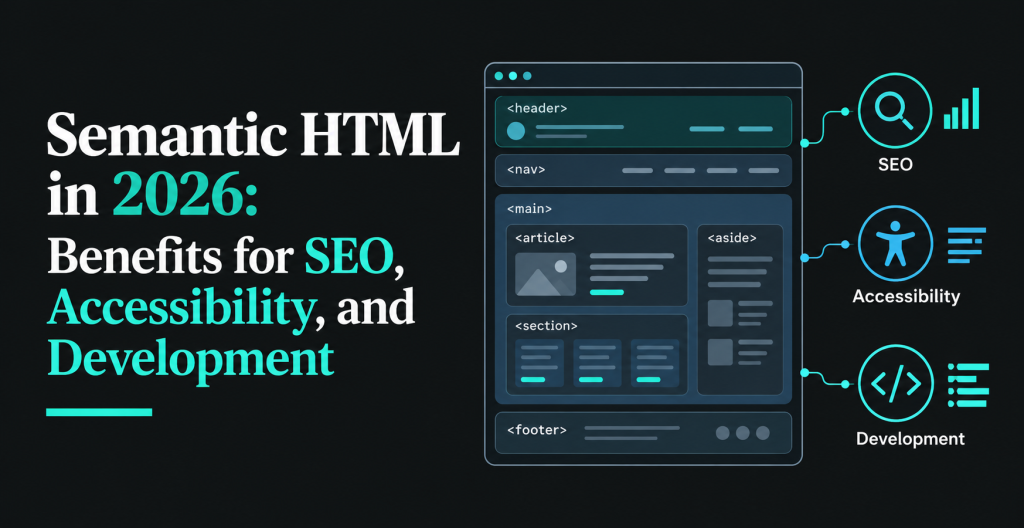
Semantic HTML is the practice of using HTML elements that describe the meaning and purpose of website content. Instead of building every page out of generic <div> and <span> containers, developers use elements like <header>, <nav>, <main>, and <article> so the page structure explains itself.
Why does that matter in 2026? Semantic HTML helps search engines interpret your content, lets screen readers and other assistive tools move through a page the way people expect, and gives your development team code that is easier to read, review, and change a year from now.
Whether you are converting a PSD or Figma design into HTML or building a site from scratch, picking the right element for each piece of content is one of the cheapest quality decisions in front-end work. This guide covers the benefits, compares semantic and non-semantic code with working examples, and ends with a checklist you can use on your next project.
What Is Semantic HTML?
Semantic HTML means choosing elements for what the content is, not for how it looks. A <nav> says “this is navigation,” an <h1> says “this is the main heading of the page,” and a <button> says “this is something a person can press.” Browsers, search engines, and assistive technologies all read that meaning and act on it.
Some elements carry meaning on their own, such as <img>, <h1>, <table>, and <footer>. Others, like <div> and <span>, carry none. They are fine as styling hooks, but a page built only from them tells a machine almost nothing about its own structure.
Semantic HTML vs Non-Semantic HTML
The fastest way to see the difference is to look at the same content written both ways. Here is a simple page section using only generic containers.
Non-semantic HTML
<div class=”header”>
<div class=”navigation”>
<a href=”/services”>Services</a>
</div>
</div>
<div class=”content”>
<div class=”title”>Our Services</div>
<div class=”description”>Web development.</div>
</div>
And here is the same section with elements that describe what each part is.
Semantic HTML
<header>
<nav aria-label=”Main navigation”>
<a href=”/services”>Services</a>
</nav>
</header>
<main>
<h1>Our Services</h1>
<p>Web development.</p>
</main>
Both versions can look identical once CSS is applied. The difference is what a machine can read from them. In the second version, the navigation, the main content area, and the primary heading are all identified without relying on class names. A screen reader can jump straight to the navigation or the main content, and a developer opening the file for the first time can tell what each region does in seconds.
The same idea applies to interactive elements. A clickable <div> looks like a button but behaves like plain text to the keyboard and to assistive tools.
<!– Non-semantic: no keyboard focus, no button role –>
<div class=”btn” onclick=”submitForm()”>Send</div>
<!– Semantic: focusable, announced as a button, works with Enter and Space –>
<button type=”submit”>Send</button>
Here is a quick side-by-side summary.
| Factor | Semantic HTML | Non-semantic HTML |
|---|---|---|
| Structure | Uses elements that describe their content | Relies on generic containers |
| Accessibility | Provides native roles, landmarks, and keyboard behavior | Often needs extra attributes and scripting to match |
| Code readability | Page regions are clear from the tags alone | Depends on class and ID names to explain intent |
| SEO | Gives a clear document outline for interpretation | Offers less explicit structural meaning |
| Maintenance | Easier for new developers to understand | Gets harder to follow as projects grow |
7 Benefits of Using Semantic HTML in Modern Websites
1. Helps Search Engines Understand Page Structure
Headings, lists, tables, and landmark elements give crawlers a clear outline of what a page contains and which parts belong together. Google has said it uses headings to understand the context of different parts of a page, and its systems are tolerant when the HTML is messy. Clean structure removes guesswork rather than adding a trick.
2. Makes Websites Easier to Navigate with Screen Readers
People who use screen readers often move by headings, landmarks, links, and form controls instead of reading top to bottom. Real <nav>, <main>, and heading elements give them those jump points automatically.
3. Simplifies Code Maintenance
When a block of markup is wrapped in <article> or <aside>, the next developer does not have to decode a chain of nested <div class=”box-2″> elements to find out what it is. That saves review time and reduces mistakes during redesigns.
4. Makes Front-End Collaboration Easier
Designers, developers, QA testers, and content editors all work from the same page. Meaningful tags give them a shared vocabulary. A bug report that says “the <aside> overlaps the footer” is clearer than “the third gray box is off.”
5. Supports Native Browser Features
Native elements come with behavior built in. A <button> takes focus and responds to Enter and Space. A <details> element opens and closes without JavaScript. A <label> linked to an <input> enlarges the click target. Rebuilding that behavior on a <div> costs time and usually misses edge cases.
6. Improves Code Consistency
When a team agrees that a page has one <main>, that every section has a heading, and that actions use buttons while navigation uses links, the codebase stays predictable. Predictable code is faster to test and cheaper to extend.
7. Reduces Unnecessary Markup
Semantic elements often replace a wrapper <div>, a class, and a few ARIA attributes with a single tag. Less markup means lighter pages and fewer places for things to break.
How Does Semantic HTML Help SEO in 2026?
Semantic HTML is not a shortcut to higher rankings. Google’s John Mueller has said it helps search engines understand a page but is not a direct ranking factor, and that fixing heading order on an existing site should not be expected to move rankings. He still encourages site owners to use it.
So where does the SEO value come from? Indirectly, in three ways.
- Clearer interpretation. Headings, lists, and tables break content into passages a crawler can understand and, where it makes sense, pull into snippets.
- Better user experience. Pages that are easier to scan and navigate tend to hold readers longer, which supports the goals search engines are trying to serve.
- A stronger technical base. Clean markup is easier to keep fast, crawlable, and free of the layout bugs that hurt mobile usability.
Semantic HTML and AI Search
Answer engines and AI agents also have to read your page. They work from the rendered content and structure, and the accessibility tree that screen readers use is built from the same semantic elements. A page with clear headings, labeled landmarks, and real lists and tables is simply easier for automated tools to parse. Treat that as a sensible expectation, not a guarantee of citations. Google’s own guidance for AI features points back to the basics: helpful, original content on a technically sound page.
How Does Semantic HTML Improve Website Accessibility?
Accessibility is where semantic HTML has the clearest, most measurable payoff. Three things do most of the work.
- Landmarks. <header>, <nav>, <main>, <aside>, and <footer> let assistive tools offer shortcuts to each region. If a page has more than one <nav>, give each an aria-label so users can tell them apart.
- Headings. A logical <h1> to <h6> outline lets users scan a page by heading, much like a sighted reader skims. Pick heading levels for structure, not for font size.
- Native controls. Links, buttons, form fields, and labels are focusable and operable by keyboard out of the box.
The scale of the problem is large. WebAIM’s 2026 Million report, an automated scan of the top one million home pages, found detectable WCAG failures on well over 90 percent of them, averaging 56 errors per page. WebAIM’s 2025 report also found that home pages using ARIA had more than twice as many detected errors as pages without it. That does not mean ARIA causes errors, since complex pages use more of it, but it does show that ARIA added on top of weak markup is not a fix.
The practical rule is the first rule of ARIA: if a native HTML element does the job, use it. Reach for ARIA only to fill gaps that HTML cannot cover, such as the state of a custom tab panel.
Common Semantic HTML Elements and Their Uses
| Element | Use it for | Notes |
|---|---|---|
| <header> | Introductory content for the page or a section | Often holds the logo, site title, and primary navigation |
| <nav> | A block of major navigation links | Label it when there is more than one on a page |
| <main> | The central content of the page | Use one per page, not nested in other landmarks |
| <article> | Self-contained content that makes sense on its own | Blog posts, news items, product cards |
| <section> | A thematic grouping of content, usually with a heading | Do not use it as a styling wrapper |
| <aside> | Content related to, but separate from, the main flow | Sidebars, pull quotes, related links |
| <footer> | Closing content for the page or a section | Copyright, contact details, secondary links |
How to Use Semantic HTML in PSD and Figma to HTML Conversion
A design file shows how a page looks. It does not say which block is a heading, which is a list, or which rectangle is a button. Someone has to read the design and decide, and that decision is where semantic quality is won or lost.
Visual accuracy is only half of a good conversion. A page can match the design to the pixel and still be a pile of nested <div> elements that fails keyboard users, confuses screen readers, and is painful to edit. When you hire a PSD to HTML conversion service, ask how headings, landmarks, and interactive elements are handled, not just whether the layout will match.
The same applies to modern design tools. A Figma to HTML conversion gives developers auto-layout frames and named layers that map neatly to structure, and the layer names are worth using as hints. If the finished HTML will become a CMS theme, the choices carry through to templates, so semantic structure matters just as much in a PSD to WordPress build. For a broader look at the process, see our guide to making PSD to HTML conversion hassle free.
How We Apply Semantic HTML During Design-to-HTML Conversion
This is the workflow our front-end team follows on conversion projects.
- Read the design for structure first. Before writing code, the developer marks up the file: page regions, heading levels, repeated components, and anything interactive.
- Map each design element to a native element. Titles become headings, groups of links become <nav> or lists, clickable actions become <button> or <a> depending on whether they act or navigate.
- Follow a fixed set of conventions. One <h1> per page, no skipped heading levels, one <main>, labeled landmarks where there are duplicates, and <section> only when it has a heading.
- Build responsive layouts without changing meaning. Breakpoints change presentation through CSS. The source order and the elements stay the same, so the mobile menu and the desktop menu are the same <nav>.
- Test before delivery. Keyboard-only walkthrough, an automated accessibility scan, a check of the heading outline, and HTML validation.
[Add a real project example here: a short before and after snippet from a past conversion, what changed, and the result. If accessibility scan results or maintenance time savings were measured, include them with the tool and date.]
Semantic HTML Best Practices for 2026
- Use one <h1> per page and keep heading levels in order, with no jumps from <h2> to <h4>.
- Use one <main> element and keep repeated site-wide content such as the header and footer outside it.
- Label landmarks when a page has more than one of the same type, for example two <nav> elements.
- Use <button> for actions and <a href> for navigation. Never attach click handlers to a <div> to fake either.
- Connect every form field to a <label>, and group related fields with <fieldset> and <legend>.
- Use lists for lists and tables for tabular data. Do not use tables for layout.
- Write meaningful alt text for informative images and an empty alt=”” for decorative ones.
- Add ARIA only when no native element covers the need, and test it with a screen reader.
- Validate the HTML, run an automated accessibility scan, and tab through the page with a keyboard before release.
Common Semantic HTML Mistakes to Avoid
Choosing Headings for Their Size
Picking an <h4> because it looks right, or skipping levels for visual effect, breaks the outline that screen reader users rely on. Set the level by structure and control the size with CSS.
Building Buttons Out of Divs
A styled <div> with a click handler is not focusable and is not announced as a control. Use a real <button>.
Wrapping Everything in Section
A <section> without a heading is rarely the right choice. If the wrapper exists only for styling, a <div> is the honest tag.
Misusing Landmarks
Multiple <main> elements, an unlabeled second <nav>, or a <header> used as a generic wrapper all weaken the landmark map that assistive tools build.
Layering ARIA on Top of Bad Markup
Adding role=”button” to a <div> still leaves you to rebuild focus and keyboard handling by hand. The native element does all of that for free.
Final Thoughts
Semantic HTML will not rank a page by itself, and nobody should sell it that way. What it does is make a website easier for people, assistive tools, search engines, and your own developers to understand. Those gains are cheap to get at build time and expensive to retrofit later.
If you are planning a design-to-code project, the markup quality deserves as much attention as the visual match. Our HTML conversion services and front-end maintenance and support are built around that idea.
Need Clean, Semantic HTML for Your Website?
Turning a design into a working website takes more than matching the layout. The underlying HTML should be structured, accessible, responsive, and easy to maintain.
At Pixel Perfect HTML, we help businesses and agencies convert PSD and Figma designs into functional HTML websites. Explore our PSD to HTML and Figma to HTML conversion services to learn more about our process, or talk to us about your project.
About the Author


